SCORM Explained: What It Is, Why It Matters, How to Use It
SCORM explained in plain English — what it is, SCORM 1.2 vs 2004, how to create SCORM-compliant courses, and how to fix the problems that actually break tracking.
SCORM is the technical standard that lets an elearning course talk to a Learning Management System. It tracks who completed what, what score they got, how long they spent, and whether they passed. It's why a single compliance course can be uploaded to Moodle, Cornerstone, Totara, or TalentLMS and work in all of them without being rebuilt. If you build elearning for a living, you need to understand SCORM. If you don't, you'll end up with courses that look beautiful and report nothing.
This guide explains SCORM in plain English — what it stands for, the difference between SCORM 1.2 and SCORM 2004, what data it actually tracks, how to create a SCORM course, and how to fix the specific problems that break SCORM tracking in real LMSs.

What SCORM stands for (and why it matters)
SCORM stands for Sharable Content Object Reference Model. It was developed by the US Department of Defense's Advanced Distributed Learning (ADL) initiative, first released in 2000, with major updates in 2001 (1.2), 2004, and subsequent editions of 2004.
The purpose of SCORM is interoperability. Before SCORM, a course built for one LMS wouldn't work in another without significant rebuilding. Every LMS vendor had their own proprietary format. If you changed LMS platforms, you rebuilt your entire course library.
SCORM solved this by defining two things:
-
A packaging format. A SCORM course is a .zip file with a specific internal structure. The file contains the course content (HTML, CSS, JavaScript, media) plus a manifest file (
imsmanifest.xml) that tells the LMS what's in the package and how to run it. -
A communication protocol. When a learner opens the course, it talks to the LMS through a defined JavaScript API. The course reports things like completion status, score, time spent, and (in SCORM 2004) individual interaction responses.
For a practising instructional designer, the important thing is what this enables: one course file, portable across LMSs, reporting back consistently to whatever platform it's uploaded to.
SCORM 1.2 vs SCORM 2004 — the practical difference
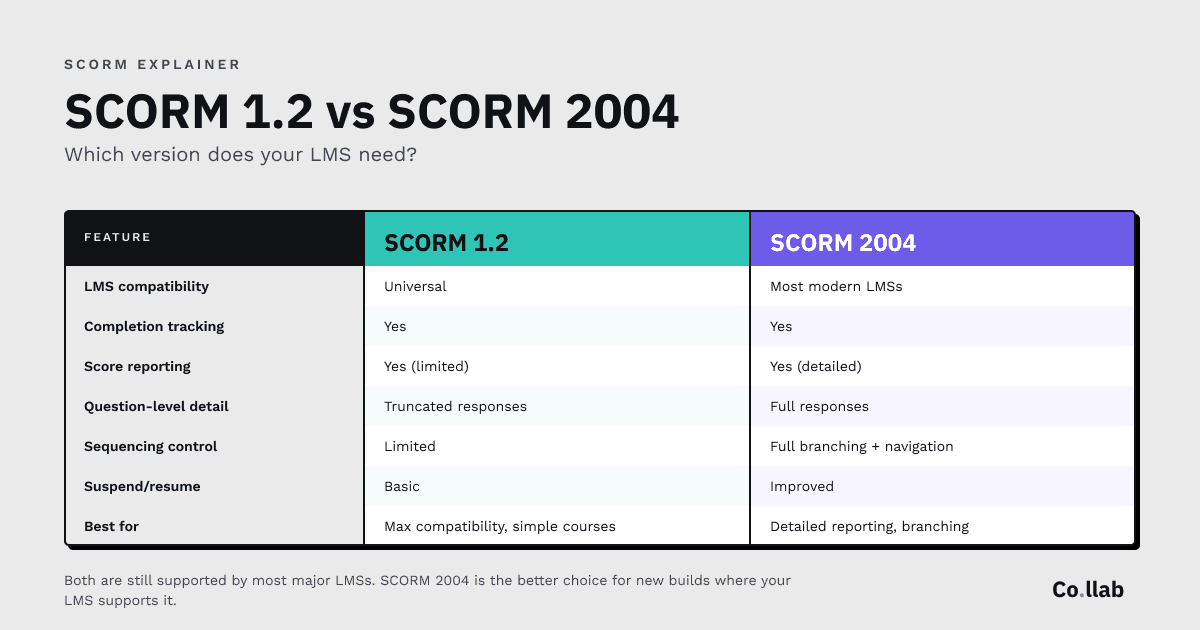
The two main versions of SCORM in active use are SCORM 1.2 and SCORM 2004. Both are still supported by most major LMSs. The question most course builders face is which one to export to.
SCORM 1.2 (released 2001) is the older, simpler standard. It's ubiquitous — supported by essentially every LMS in existence. Its limitation is that it tracks fewer data points than SCORM 2004, and question-level reporting is limited.
SCORM 2004 (multiple editions from 2004 onwards) added significant capabilities:
- More detailed sequencing and navigation control (the course can control what the learner sees next based on their responses)
- Detailed interaction-level reporting (which specific answers were given, not just the overall score)
- Better handling of long-form assessments
- Improved suspend/resume functionality
Quick comparison
Which to choose:
- If you don't know what your learners' LMS supports, choose SCORM 1.2. It will work everywhere.
- If you need detailed per-question reporting (common in compliance and assessment-heavy courses), choose SCORM 2004.
- If your LMS supports both (most modern platforms do), SCORM 2004 is the better choice for new builds.
One thing worth knowing: some authoring tools export SCORM 2004 in ways that don't pass grade scores exactly the same way SCORM 1.2 does. For most courses this doesn't matter. For detailed assessment reporting, test both in your specific LMS before committing.
What data does SCORM actually track?
SCORM doesn't track learning in any meaningful sense. It tracks interaction with the course. That's an important distinction.
What SCORM reports to your LMS:
- Completion status. Did the learner complete the course? (Options: incomplete, completed, passed, failed, browsed, not attempted.)
- Score. A numeric score, typically 0–100, if the course has an assessment.
- Time spent. How long the learner had the course open.
- Pass/fail. Based on whether the score met the pass threshold you set in the course.
- Interaction data (SCORM 2004 only). For each question or interaction: what the learner did, what the correct answer was, whether they got it right, how long they took.
What SCORM does not track:
- Whether the learner actually learned anything
- How the learner applies knowledge back in their job
- Behaviour change over time
- Competency development
- Informal learning, peer discussion, or learning that happens outside the course
This is why many L&D teams have moved some tracking to xAPI (more on that below) — but for compliance reporting, training records, and standard LMS integration, SCORM is still what's required.
What your LMS admin actually sees. A typical SCORM-reported dataset for a learner includes: course ID, learner ID, completion status, final score, time spent, and date of completion. That's what populates training records, compliance reports, and certificate generation in most LMS platforms.
xAPI vs SCORM — do you need to care about xAPI?
Short answer: probably not, unless you specifically need to track learning outside a course.
xAPI (also called Tin Can API) is a newer specification — designed to track learning anywhere, not just inside a SCORM course in an LMS. It can record statements like "Paul completed a mentoring session on 15 April 2026" or "Sarah watched a 10-minute video on a mobile device." It's more flexible and more powerful than SCORM, but it requires infrastructure that SCORM doesn't — specifically, a Learning Record Store (LRS) to receive and store the data.
When xAPI matters:
- Tracking learning that happens outside a course (videos, peer sessions, on-the-job activities)
- Detailed analytics on learning behaviour over time
- Integration with performance support and informal learning tools
- Sophisticated learning ecosystems with multiple platforms
When SCORM is fine:
- Standard compliance training tracked by an LMS
- Simple training records (who completed what, when)
- Integration with existing LMS infrastructure
- Anything where the course is the unit of tracking
Most elearning authoring tools now export both SCORM and xAPI. Most LMSs accept both. The choice depends on what downstream system will receive the data, not on which standard is "better."
How to create a SCORM-compliant course
There are two practical routes to a SCORM-compliant course in 2026:
Route 1: Use an authoring tool that outputs SCORM
This is how 95% of SCORM courses are created. The major tools all export to SCORM:
- Articulate Storyline and Rise 360 — SCORM 1.2, 2004, xAPI, cmi5
- Adobe Captivate — SCORM 1.2, 2004, xAPI
- iSpring Suite — SCORM 1.2, 2004, xAPI
- Co.llab (currently in closed beta) — SCORM 1.2, 2004, and SCORM import (rebuild existing SCORM courses)
- Lectora — SCORM 1.2, 2004, xAPI
The export process is similar across all of these: build your course in the authoring tool, choose "publish to SCORM" or equivalent, select the SCORM version, and the tool produces a .zip file ready to upload to your LMS.
If you're using AI to build the course itself before exporting to SCORM, our step-by-step walkthrough on building elearning courses with AI covers the whole process from source material to SCORM export.
Our full comparison of elearning authoring tools covers the differences in detail.
Route 2: Wrap existing content manually
Possible but rarely recommended. You can take HTML content and wrap it in a SCORM-compliant package manually — creating the imsmanifest.xml file, the SCORM runtime wrapper, and the communication code that talks to the LMS. Tools like SCORM Driver from Rustici Software automate parts of this process.
This route is for developers with a specific reason to avoid authoring tools. For most IDs, use an authoring tool.
What to test before uploading to your LMS
A SCORM course that works in testing sometimes fails in the production LMS. This is common and usually fixable. Test everything below before declaring a course done:
Core functionality:
- Does the course launch when clicked?
- Does the first page load correctly?
- Do all pages/modules navigate correctly?
- Do embedded videos play?
SCORM-specific:
- Does the course report as "completed" when it should?
- Does the score reach the LMS gradebook?
- Does the pass mark trigger the correct completion status (passed/failed)?
- If a learner closes the course mid-way, does it resume where they left off?
- Does the time-spent data record?
User experience:
- Does the course work on mobile devices (if learners will use mobile)?
- Does the course work on the specific browsers your organisation uses?
- If the course has audio or video, does it play on all devices?
- Is the course accessible (keyboard navigation, screen reader, colour contrast)?
The right testing sequence:
-
SCORM Cloud (free from Rustici Software). Upload the course and run it as a test learner. SCORM Cloud reveals most SCORM implementation issues cleanly, with detailed logs. Start here — it catches 80% of problems.
-
Your actual LMS, in a sandbox or test environment. SCORM behaviour varies by LMS. A course that passes SCORM Cloud testing can still fail in Cornerstone, Moodle, or Totara because of platform-specific quirks.
-
Your actual LMS, production environment, test user account. Final verification. If it works here, it works.
Common SCORM problems and how to fix them
The most frequent SCORM issues, in order of how often they come up in real deployments:
1. The course won't mark as "completed."
Usually caused by the course not reaching the "completion trigger" — whatever event tells the LMS the learner has finished. Check: does the course have a designated completion trigger (reaching the final page, passing an assessment, clicking a "finish" button)? Is the trigger actually firing? Some authoring tools require explicit completion settings that are off by default.
2. Score doesn't reach the LMS.
Check: does the course actually have a scored assessment? Some assessments report as "completed" but don't pass a numeric score if the reporting setting is wrong. In Articulate, this is the "Report Score" option. In iSpring, it's in the publish settings. In Captivate, check the quiz reporting settings.
3. "Works in SCORM Cloud, fails in [Moodle/Cornerstone/Totara]."
This is almost always an LMS-specific quirk. Common culprits: strict content security policies that block embedded content, mobile rendering issues, caching problems, or LMS-level SCORM version restrictions. Contact your LMS admin — they'll usually know the fix for their specific platform.
4. Resume-on-close doesn't work.
Check: is "suspend data" enabled in the course publish settings? This is what tells the LMS to save the learner's position. Without it, the course restarts every time.
5. Duplicate navigation buttons (SCORM 2004 specific).
Some LMSs display their own navigation buttons alongside the course's built-in navigation. In Articulate Rise, there's a "Hide LMS Interface" setting in the SCORM 2004 publish options that removes this duplication. Other tools have equivalent settings.
6. Embedded YouTube / Vimeo videos don't play.
Usually a content security policy issue in the LMS. Workarounds: use locally-hosted video files (increases package size), or use video hosting that supports LMS embedding (Wistia and Loom have better LMS compatibility than YouTube).
The SCORM import problem — and why it matters
Most authoring tools let you export SCORM. Almost none of them let you import an existing SCORM file and edit it.
This matters if you've been building elearning in Articulate (or iSpring, or Captivate) for years and want to switch to a different tool. Your existing course library is effectively locked to the tool you built it in. Leaving means rebuilding everything from scratch.
Co.llab is the current exception. It supports SCORM import — you can feed an existing SCORM package into the tool, and it will extract the content, regenerate the structure with AI-applied instructional design logic, and produce a new course that's properly SCORM-compliant. This isn't a replacement for good source material, but it does mean your back catalogue isn't trapped.
No other major authoring tool offers this today.
The honest bottom line
SCORM is old technology solving a real problem. It isn't glamorous, it isn't exciting, and most people who build elearning for a living understand it just well enough to get courses to work. That's usually enough. (If you're building elearning as a freelance ID, our toolkit covers tool choice, rates, and how AI is changing the workflow.)
Where it becomes worth understanding in more depth: when something breaks. When a course works in SCORM Cloud but fails in production. When the completion status doesn't update. When the score doesn't pass through. These are the moments when SCORM knowledge saves you a week of debugging.
The five-minute version: SCORM packages your course into a .zip, the course talks to the LMS through a defined API, SCORM 1.2 is universal and simple, SCORM 2004 is better for detailed reporting, and you should always test in your actual LMS before declaring the course done.
That's SCORM.
Join the Co.llab waitlist
Co.llab is in closed beta with 80+ testers — public release when the product is ready. It outputs SCORM 1.2 and SCORM 2004, and supports SCORM import to rebuild your existing course library. Pricing will be announced when Co.llab opens, based on beta feedback. One-time payment, no subscription.
Sign up to be the first to know — and get 130 free AI prompts for instructional designers as thanks. A working toolkit you can use today.
By Paul Thomas, L&D consultant and founder of The Human Co.