How to Build an Elearning Course with AI (Step-by-Step)
A working ID's step-by-step guide to building an elearning course with AI in 2026 — from source material to SCORM export, plus where human judgment still matters.
Building an elearning course with AI in 2026 looks nothing like the "generate a course in 60 seconds" demos from a few years ago. The tools are better, the output is better, and — most importantly — the process actually works. But only if you use it properly.
Quick answer: There are five steps to building an elearning course with AI in 2026, in this order: (1) prepare your source material, (2) define the learner and the outcome, (3) review the structure before the AI builds it, (4) review and refine the output, (5) export and test in your LMS. The AI handles the production. The human handles judgment. Skip step 3, and you'll rebuild the whole thing anyway.

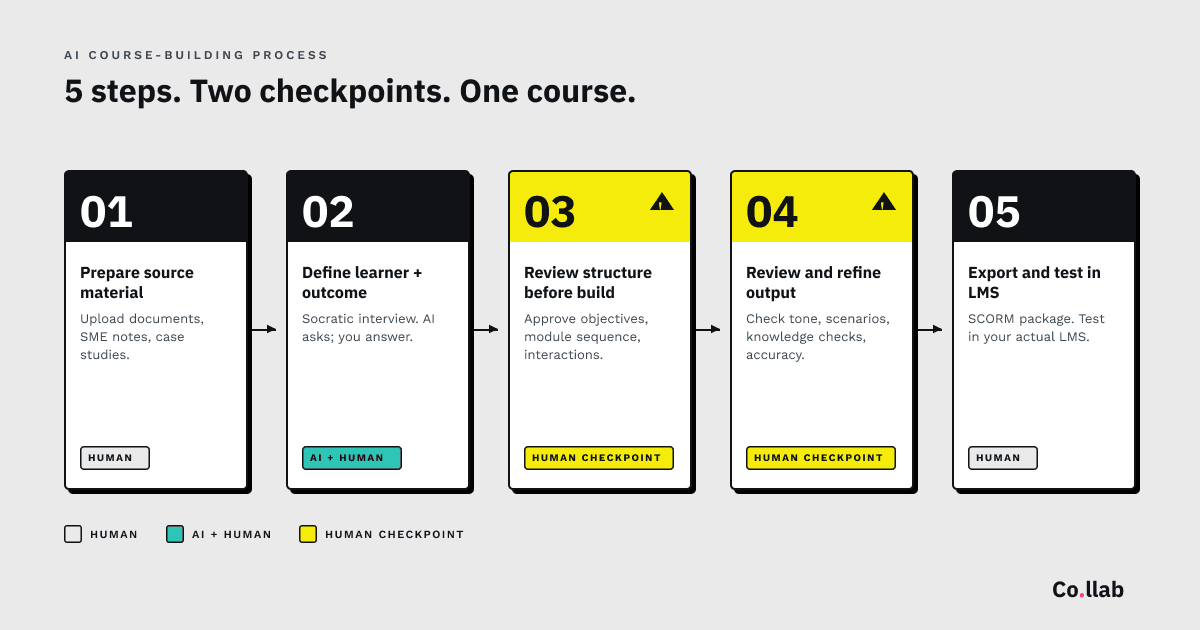
This guide walks through each step the way a practising instructional designer would actually do it — not the way a marketing demo shows it.
What AI is actually doing in elearning (and what it isn't)
Before the how-to, a clear-eyed frame of what AI is and isn't doing in course authoring right now.
What AI is doing well in 2026:
- Applying instructional design logic — Bloom's taxonomy progression, learning objective structuring, module sequencing — to your source material
- Generating scenario-based learning from case studies and incident reports
- Creating knowledge checks, flashcards, and assessment questions at appropriate cognitive levels
- Producing draft narrative frames, branching scenarios, and character dialogue
- Converting structured content (policies, procedures, SME interviews) into cohesive course flow
What AI is not doing well:
- Knowing what matters for your specific audience without being told
- Catching factual errors when your source material contains them
- Understanding cultural context, sensitive topics, or regulated industries without explicit guidance
- Deciding what the course should be about — that's still a human judgment call
- Replacing SME review for accuracy
The AI isn't magic. It's a tool that does the production burden well if you do the preparation and review properly. The rest of this guide is about doing those two things properly.
What you need before you start
Three things. If any of these are missing, stop and sort them before you touch the AI:
-
Source material that actually exists. Procedure documents, policies, SME interview notes, case studies, incident reports, existing training decks. Not "a vague idea of what this course should cover." Real documents.
-
A clear idea of what the learner should do differently afterwards. Not "learn about GDPR." "Be able to identify a data breach within 30 minutes and trigger the correct escalation." Specificity here is the difference between a good course and a generic one.
-
Permission to iterate. The first output won't be perfect. Build that expectation in before you start.
If you've got those three things, you're ready.
Step 1 — Prepare your source material
This is the step most people skip, and it's the step that determines whether the rest of the process works.
What counts as good source material:
- Procedure documents that describe the actual steps your learners need to perform
- SME interview notes or transcripts (more on this below)
- Case studies with real outcomes and real decisions
- Incident reports that show where people went wrong
- Existing training decks or documents from previous versions of the course
- Regulatory text if the course has a compliance component
What doesn't count as source material, no matter how much of it you have:
- Vague briefs ("we want something about leadership")
- Marketing copy (too polished, too abstract)
- Organisational mission statements
- Random Word documents titled "ideas"
The curation test. Before uploading anything, ask: does this document describe what actually happens, or does it describe what we wish happened? Upload the first kind. Delete the second kind.
SME interviews work best when they're specific. The question that draws out usable material isn't "what should this course cover?" It's "walk me through what happens when someone gets this wrong." You'll get specifics, edge cases, and the tacit knowledge your SME has that isn't written down anywhere.
Record the interview. Transcribe it. Upload the transcript. The AI will use it.
The volume question. How much source material is enough? A 30-minute course needs roughly 15–25 pages of focused source material (procedures, case studies, SME notes). A 200-page policy document is too much and too broad — curate it to the relevant sections before uploading.
Step 2 — Define the learner and the outcome
Once the source material is ready, the next step is telling the AI who the course is for and what it's trying to achieve.
The best AI tools for course building in 2026 do this through a conversational interface — sometimes called a Socratic interview — where the AI asks you questions about your audience, their prior knowledge, and the specific outcome you want. If you're using a general AI like Claude or ChatGPT, you can replicate this by prompting the AI to interview you before it produces anything.
The questions that matter most:
- Who is this course for? Specifically — role, experience level, context of their work.
- What do they already know? What can you assume?
- Where do they typically go wrong? What's the common failure point?
- What does a bad version of this look like? What should the course avoid?
- What should they be able to do after completing this, that they couldn't before?
The last question is the critical one. Most course briefs are written as coverage lists ("module 1 will cover X, module 2 will cover Y"). That's a content outline, not a learning outcome. The AI works much better when you give it a performance outcome to design towards.
Tacit knowledge capture. This is where a good AI workflow outperforms traditional authoring. The AI asks questions you wouldn't think to answer, and your answers become the specifics that make the course feel like it was built for your organisation. "What's the most common mistake?" is a question most briefs never ask. Your answer is the thing that makes the scenario feel real.
Step 3 — Review the structure before the AI builds
This is the step most people want to skip to save time. Skipping it costs more time than it saves.
Before the AI generates the full course, you should see and approve:
- Learning objectives — are these the right outcomes?
- Module sequence — does this build in the right order? (Bloom's progression: Remember → Understand → Apply → Analyse → Evaluate → Create)
- Proposed interactions — where does the course use knowledge checks, scenarios, hotspots, branching?
- Assessment strategy — is there a final assessment? What's the pass mark? What's it testing?
This is your human checkpoint. Ten minutes here saves two hours later.
What to look for:
- Objectives that describe learner performance ("be able to identify...") not content coverage ("learn about...")
- Module sequence that respects prerequisite knowledge — you can't assess analysis before you've taught application
- Interaction placement that supports the learning objective — not "we put a knowledge check here because we need one"
- Assessments that test what the course actually taught, not what's easy to test
If the structure is wrong, fix it here. The AI will happily regenerate the blueprint based on your feedback. It won't regenerate the finished course as easily.
Step 4 — Review and refine the output
Once the structure is approved and the AI builds the course, you'll get a draft that's usually 70–80% of the way there. The last 20–30% is the part that makes it actually good.
What to check, in this order:
1. Tone and audience fit. Does this sound like it's written for your specific audience, or does it read as generic? If it's generic, the AI either didn't have enough source material or wasn't given enough context about the learner in step 2. Go back and fix that, not the output.
2. Scenario realism. AI-generated scenarios often feel slightly off — the consequences are too mild, the dialogue is too formal, the stakes don't match real life. Rewrite to match what actually happens in your organisation. A compliance scenario where "the team felt disappointed" is weaker than one where "the regulator issued a warning and required documented corrective action within 14 days."
3. Knowledge checks that test application, not recall. The AI sometimes defaults to multiple-choice recall questions. Push it to build questions that require the learner to apply knowledge to a novel situation — "which of these responses correctly applies the policy?" not "what does the policy say?"
4. Missing context. The AI only knows what's in your source material. If something important was in the SME's head but not in the documents, it won't appear. Scan for gaps — particularly around edge cases, exceptions, and things SMEs usually mention verbally.
5. Factual accuracy. Don't trust the AI on specifics. Check dates, names, policy references, regulatory citations. This is non-negotiable.
Step 5 — Export and test in your LMS
Final step — packaging and testing. This is where most AI course tools still need a human to verify the output works properly in the wild.
SCORM 1.2 vs SCORM 2004. The two standards serve different needs. SCORM 1.2 is ubiquitous and simpler; SCORM 2004 supports better sequencing and detailed interaction reporting. Most LMSs accept both. We've written a separate deep-dive on SCORM if you need to understand the differences in detail.
What to test:
- Completion tracking — does the course correctly report as complete when it should?
- Score reporting — does the assessment score pass through to the LMS gradebook?
- Resume-on-close — if the learner closes the course mid-way, does it resume where they left off?
- Mobile rendering — does the course work on the devices your learners will actually use?
- Video and audio playback — specifically if there are DRM or embed restrictions
Test in your actual LMS, not just SCORM Cloud. SCORM Cloud is useful for initial verification, but LMS behaviour varies — a course that works perfectly in SCORM Cloud can break in Cornerstone or Totara because of specific LMS quirks. Always do a final test in the production environment, ideally with a test learner account.
Where human judgment is still non-negotiable
Five areas where AI should never operate unsupervised:
1. SME accuracy review. The AI doesn't know your subject. Your SME does. Every course needs a proper SME review of factual content before launch — not a skim, a structured review.
2. Accessibility. AI-generated courses need accessibility testing — colour contrast, keyboard navigation, screen reader compatibility, alt text on images, captions on video. Don't assume the AI handled this properly.
3. Sensitive topics. Courses covering mental health, safeguarding, clinical content, legal content, or anything involving vulnerable populations need human review from a subject expert. The AI will produce plausible content. Plausible isn't the same as safe.
4. Cultural specificity. AI defaults tend toward US corporate norms. If your learners are UK NHS staff, or German engineers, or Brazilian front-line workers, the cultural defaults in the AI's output need checking and rewriting.
5. Regulated content. Anything that touches GDPR, HIPAA, FCA rules, Ofsted requirements, or industry-specific regulation needs a compliance review by someone qualified to do it. No AI tool replaces this. Our deeper guide to building compliance training with AI covers the specific review checkpoints and where AI helps versus where humans must stay firmly in the loop.
Tools that build courses with AI in 2026
The landscape has matured significantly — see our 2026 overview of AI course generators for the full category breakdown. Three honest options worth knowing about:
End-to-end AI course tools. Co.llab is currently in closed beta with 80+ testers — public release when the product is ready. It runs the full process described in this guide — source upload, Socratic interview, structured review, full course build, SCORM export — in one desktop application. One-time payment, no subscription (pricing announced after beta feedback). Full disclosure: Co.llab is built by The Human Co.
AI-assisted authoring within traditional tools. Articulate 360's AI Assistant, iSpring's AI features, and Adobe Captivate's generative features all add AI into an existing authoring workflow. Useful if you're already committed to those tools; they assist with text generation and image creation but don't do the instructional design work end-to-end. See our full comparison of elearning authoring tools for details.
DIY with a general-purpose AI. You can build a course using Claude or ChatGPT and a standard authoring tool. Works if you're methodical about prompting, know your instructional design framework cold, and don't mind doing the integration work yourself. Slower than a dedicated tool, but zero additional software cost.
The honest bottom line
Building an elearning course with AI in 2026 works. It doesn't work the way the marketing suggests — there's still real work involved, and human judgment is still the thing that makes the output worth having. But the production burden, which used to be 80% of the job, is now 20%. That's a significant change.
The skill that matters now isn't being fast in Storyline. It's knowing what good source material looks like, how to extract tacit knowledge from SMEs, what questions to ask about the learner, and where to apply human judgment in the review. That's the same skill experienced IDs have always had. AI just makes it more valuable.
The freelance IDs and training providers who'll win in this landscape are the ones who already know how to design learning, and now spend less time operating authoring tools and more time doing the thinking that actually produces good courses.
Join the Co.llab waitlist
Co.llab is in closed beta with 80+ testers — public release when the product is ready. Pricing will be announced when Co.llab opens, based on beta feedback. One-time payment, no subscription.
Sign up to be the first to know — and get 130 free AI prompts for instructional designers as thanks. A working toolkit you can use today.
By Paul Thomas, L&D consultant and founder of The Human Co.